Plan Do Check Act PowerPoint Template
Free Plan Do Check Act PowerPoint Template is a free PPT template with a ready-made Plan Do Check Act diagram for your PowerPoint presentations or business slide designs.
- Format
- .zip
- Downloads
- 20,210
About this template
Free Plan Do Check Act PowerPoint Template is a free PPT template with a ready-made Plan Do Check Act diagram for your PowerPoint presentations or business slide designs. You can download a free PDCA diagram for presentations in Microsoft PowerPoint. Free Deming Cycle uses a cycle diagram to produce a nice PDCA cycle in a PowerPoint slide design. Alternatively, you can download other free quality management PowerPoint templates and backgrounds for presentations or free PowerPoint templates and slide designs.
PDCA can be used as a problem-solving approach; Dr. W. Edwards Deming coined it. When implemented correctly, the system can reduce non-conformances from re-occurring challenges to resolve issues. This free PDCA template is designed with tested problem-solving methodologies and planned monitoring activities.
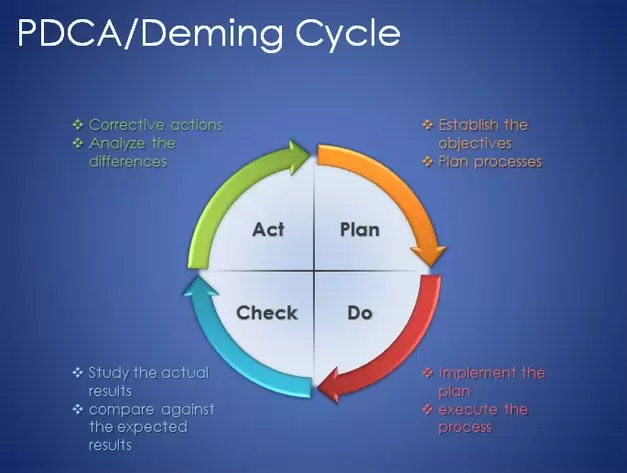
You can use the PDCA methodology and PDCA diagram for PowerPoint presentations for:
- Presentations on problem-solving and describe problem-solving process in PowerPoint
- Daily routine management for the individual or teams
- Project management tasks
- Process trials
- Continuous development processes
- Vendor development and sales presentations
- Human resources development and career PowerPoint presentations
- New product development
The PDCA template can also be used in Quality Assurance plans or as a free PowerPoint template for Total Quality Management presentations.
How to customize it
- Download the file. If it arrives as a .zip, extract it to get the .pptx.
- Open it in PowerPoint or Keynote, or upload it to Google Drive and choose Open with › Google Slides.
- Click any shape or text box to edit it. Change colours under Shape Format › Shape Fill.
- Delete the slides you don’t need, then save under a new name.
Questions
Is this template free?
Yes. It is free to download with no account. Free for personal and commercial use. Edit freely, no credit needed. Don’t resell or re-upload the templates themselves.
Does it work in Google Slides or Keynote?
It is a PowerPoint (.pptx) file. Google Slides and Keynote both open .pptx files; upload it to Google Drive and choose Open with › Google Slides, or open it directly in Keynote. Some effects can look slightly different outside PowerPoint.
Can I change the colours and text?
Yes. The diagrams are built from editable shapes and text boxes, so you can recolour, resize and rewrite every element.