Eco Environment PowerPoint Template
Download the free Eco Environment PowerPoint template as a professional PowerPoint presentation template that you can use for presentations on sustainability topics and the environment in general.
- Format
- .zip
- Downloads
- 28,568
About this template
Download the free Eco Environment PowerPoint template as a professional PowerPoint presentation template that you can use for presentations on sustainability topics and the environment in general. Free Eco PowerPoint template contains unique slide designs ready for sustainable projects. You can use this green eco template for PowerPoint to make awesome green company presentations, prepare reports about your green impact, or educational PowerPoint presentations on Education for Sustainable Development or renewable energy presentations using Microsoft PowerPoint.
This free environmental PowerPoint template’s cover slide designs have an excellent footprint illustration and space to add your presentation title. Eco environment slides for PowerPoint come with unique slide designs ready to be used in your PowerPoint presentations.

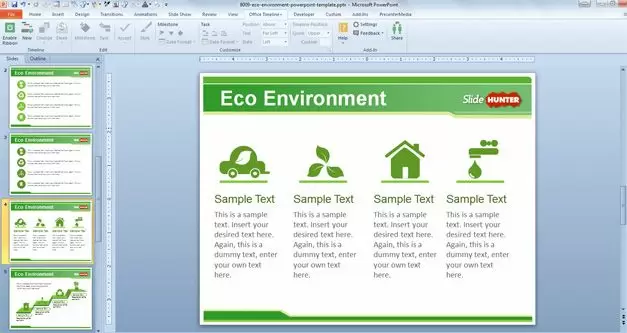
For example, you can use the slide with steps ladder climbing style and free green icons in your green PowerPoint presentations. You can find icons relevant to green topics like the free trash icon, free recycle icon for PowerPoint, clean energy bulb light, and other useful icons for clean energy presentations. In the figure above, you can also see other helpful clipart and icons like the clean house icon, the water drop icon, the green leaves for nature presentations, and the green car for clean energy topics.

Other slides can also be used in your PowerPoint presentations to make attractive slide shows; for example, the figure above shows an example and alternative layout to the bullet points.
How to customize it
- Download the file. If it arrives as a .zip, extract it to get the .pptx.
- Open it in PowerPoint or Keynote, or upload it to Google Drive and choose Open with › Google Slides.
- Click any shape or text box to edit it. Change colours under Shape Format › Shape Fill.
- Delete the slides you don’t need, then save under a new name.
Questions
Is this template free?
Yes. It is free to download with no account. Free for personal and commercial use. Edit freely, no credit needed. Don’t resell or re-upload the templates themselves.
Does it work in Google Slides or Keynote?
It is a PowerPoint (.pptx) file. Google Slides and Keynote both open .pptx files; upload it to Google Drive and choose Open with › Google Slides, or open it directly in Keynote. Some effects can look slightly different outside PowerPoint.
Can I change the colours and text?
Yes. The diagrams are built from editable shapes and text boxes, so you can recolour, resize and rewrite every element.