4-Step Circular Process Diagram for PowerPoint
Free 4-Step Circular Process Diagram for PowerPoint is a free diagram for your presentations in PowerPoint. You can download this original and nice diagram to enhance your presentations in Microsoft PowerPoint.
- Format
- .zip
- Downloads
- 11,800
About this template
Free 4-Step Circular Process Diagram for PowerPoint is a free diagram for your presentations in PowerPoint. You can download this original and nice diagram to enhance your presentations in Microsoft PowerPoint. This free cycle diagram for PowerPoint can be used to show a process and its steps during a presentation slideshow. You can download and use this cycle diagram to decorate your business processes.
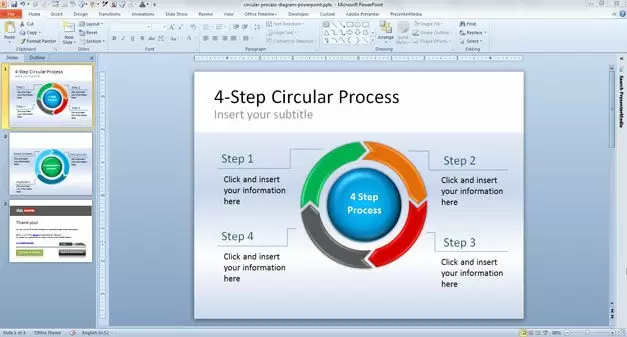
The free diagram template for PowerPoint comes with two different slides using different color scheme for the process steps. There is a central circle where you can enter the name of the process.
How to customize it
- Download the file. If it arrives as a .zip, extract it to get the .pptx.
- Open it in PowerPoint or Keynote, or upload it to Google Drive and choose Open with › Google Slides.
- Click any shape or text box to edit it. Change colours under Shape Format › Shape Fill.
- Delete the slides you don’t need, then save under a new name.
Questions
Is this template free?
Yes. It is free to download with no account. Free for personal and commercial use. Edit freely, no credit needed. Don’t resell or re-upload the templates themselves.
Does it work in Google Slides or Keynote?
It is a PowerPoint (.pptx) file. Google Slides and Keynote both open .pptx files; upload it to Google Drive and choose Open with › Google Slides, or open it directly in Keynote. Some effects can look slightly different outside PowerPoint.
Can I change the colours and text?
Yes. The diagrams are built from editable shapes and text boxes, so you can recolour, resize and rewrite every element.