Business Earth Globe Concept Slide for PowerPoint
Business Earth Globe Concept Slide for PowerPoint is a free presentation template with business pictures. Inside this presentation template you can find useful slide designs with globe and satellite Earth view.
- Format
- .pptx
- Downloads
- 3,909
About this template
Business Earth Globe Concept Slide for PowerPoint is a free presentation template with business pictures. Inside this presentation template you can find useful slide designs with globe and satellite Earth view.
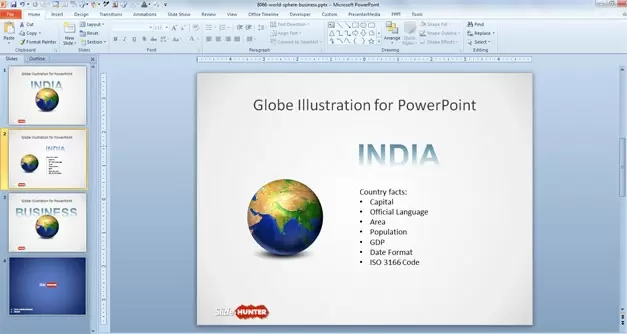
The first slide has India title and a nice 3D sphere design. You can use this presentation template to prepare awesome slides with information about countries for example we have used the shape to represent a country facts slide design or you can use it for topics about globe in a PowerPoint presentation, discuss about GDP, make industry PowerPoint slides or even use the Earth clipart and graphic to decorate your presentations.

Alternatively you can make some nice cover slides to be used for business presentations like the graphic or free business pictures you can see in the figure above. You can easily edit the text and use any desired text instead of BUSINESS words.
How to customize it
- Download the file. If it arrives as a .zip, extract it to get the .pptx.
- Open it in PowerPoint or Keynote, or upload it to Google Drive and choose Open with › Google Slides.
- Click any shape or text box to edit it. Change colours under Shape Format › Shape Fill.
- Delete the slides you don’t need, then save under a new name.
Questions
Is this template free?
Yes. It is free to download with no account. Free for personal and commercial use. Edit freely, no credit needed. Don’t resell or re-upload the templates themselves.
Does it work in Google Slides or Keynote?
It is a PowerPoint (.pptx) file. Google Slides and Keynote both open .pptx files; upload it to Google Drive and choose Open with › Google Slides, or open it directly in Keynote. Some effects can look slightly different outside PowerPoint.
Can I change the colours and text?
Yes. The diagrams are built from editable shapes and text boxes, so you can recolour, resize and rewrite every element.