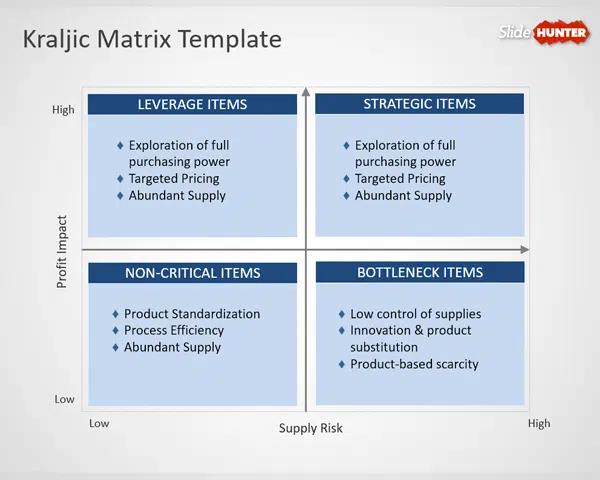
2×2 Matrix Template for PowerPoint
Free 2×2 Matrix PowerPoint template: customizable for various presentations, compatible with Google Slides, and ideal for SWOT diagrams, innovation portfolios, and comparisons. Fully editable and free to download.
- Format
- .pptx
- Downloads
- 11,296
About this template
Free 2×2 Matrix Template for PowerPoint is a free PowerPoint template and PPT Matrix design.

The free 2×2 matrix PowerPoint template can be customized for a variety of presentation purposes. For example, the matrix can be used to prepare a presentation on an innovation portfolio or to make a comparison or SWOT diagram in PowerPoint. Download this free 3×3 template for PowerPoint and also compatible with Google Slides.
Our Free 2 by 2 Matrix Template for PowerPoint is the perfect tool for anyone looking to create a professional and engaging presentation with a 2×2 matrix slide. This free PowerPoint template and PPT Matrix design is fully customizable, allowing you to tailor it to your specific needs and preferences. Whether you’re preparing a presentation on an innovation portfolio, creating a comparison chart, or putting together a SWOT diagram, this 2×2 template design can be used.
One of the key benefits of this 2×2 matrix PPT template is its versatility and editability. The 2×2 matrix design can be used to organize and present information in a variety of ways, making it a valuable tool for anyone who needs to communicate complex ideas in a clear and concise manner. And with its modern and sleek design, this 2×2 matrix template for PowerPoint is sure to capture the attention of your audience and keep them engaged throughout your presentation.
In addition to its customizable features, the 2×2 matrix PPT template is also completely free to download. And because it’s compatible with both PowerPoint and Google Slides, you can easily share your presentation with others and collaborate on projects with ease.
How to customize it
- Download the file. If it arrives as a .zip, extract it to get the .pptx.
- Open it in PowerPoint or Keynote, or upload it to Google Drive and choose Open with › Google Slides.
- Click any shape or text box to edit it. Change colours under Shape Format › Shape Fill.
- Delete the slides you don’t need, then save under a new name.
Questions
Is this template free?
Yes. It is free to download with no account. Free for personal and commercial use. Edit freely, no credit needed. Don’t resell or re-upload the templates themselves.
Does it work in Google Slides or Keynote?
It is a PowerPoint (.pptx) file. Google Slides and Keynote both open .pptx files; upload it to Google Drive and choose Open with › Google Slides, or open it directly in Keynote. Some effects can look slightly different outside PowerPoint.
Can I change the colours and text?
Yes. The diagrams are built from editable shapes and text boxes, so you can recolour, resize and rewrite every element.